Become the leader in your field on Google
Learn how to use Local Map to propel your business to the top of Google results with reviews from your satisfied customers.
What is Local Map?
Local Map offers you a complete solution that allows you to quickly and easily collect Google reviews from your satisfied customers!
The Impact of Google Reviews
Every review left by your customers on Google sends a strong signal of trust. In other words, by giving you 5 stars, your customers independently tell Google that your business is the best and that they trust you. Google will therefore quickly position you at the top for future searches by people looking for a business in your field. The key is to collect reviews naturally and regularly.
The Winning Approach
THE SECRET IS IN THE APPROACH
The way you ask a satisfied customer to write a review has a huge impact on your results. Make them feel the importance for your business of receiving their review. Thank them in advance for taking the time to write and mention that you are very grateful. If the customer is not informed and receives a request, you reduce your chances of getting their review.
Develop a New Reflex
From today, you will need to target the best time to ask your satisfied customer to write a review for the services they received. You don't need to close a sale to ask for a review!
If you manage to satisfy a customer by responding to a simple information request by phone, take the opportunity to ask them for a review of your service.
A customer who hesitates before buying in your business but thanks you for your help and answers; offer them the opportunity to express their satisfaction!
You must seize every opportunity and to do this, you will need to develop this new reflex.
Installation and Usage
Follow these simple steps to install Local Map on your device
iPhone / iPad
Open Safari
Safari should open automatically by clicking on your installation link provided in the email. Otherwise open Safari and copy the link into the address bar.
Share
It's the square with an upward arrow at the bottom of the screen. A menu will appear at the bottom of the screen. If the menu doesn't appear, tap at the bottom of the window to make it appear.
To Home Screen
Swipe your finger on the grayed options until you find the one that adds the link to the home screen. It's located near the end of the menu.
Add
You can change the shortcut name. Click "Add" to finish.
Shortcut Created
This will pin the shortcut to your iPhone home screen. To use Local Map, simply tap the shortcut icon.
Android
Open Internet Browser
Your browser should open automatically by clicking on your installation link provided in the email. Otherwise open your browser and copy the link into the address bar.
Open the Menu
Click on the three dots in the top right corner of the page, then click "Add to Home screen".
Shortcut Created
This will pin the shortcut to your Android device home screen. To use Local Map, simply tap the shortcut icon.
How to Use the Application
Simple and intuitive interface to send your review requests
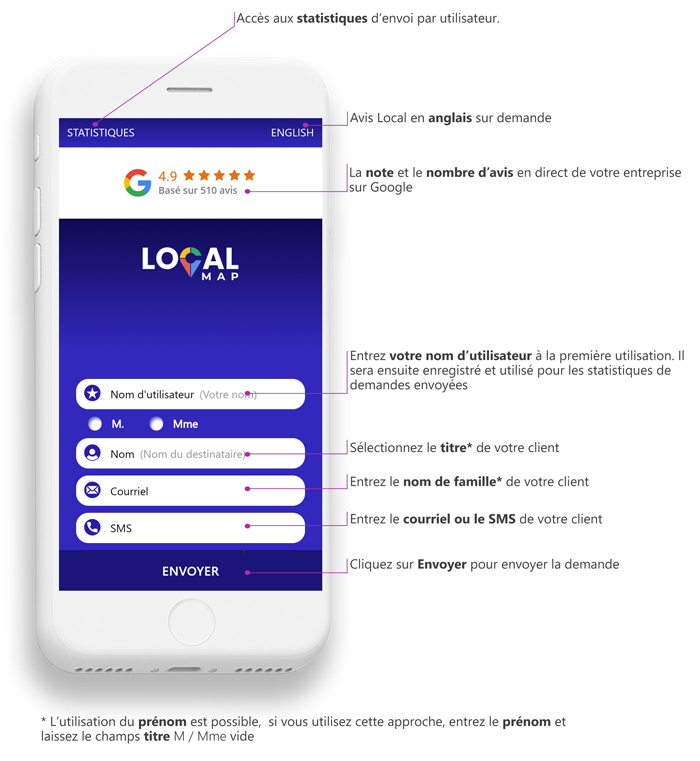
Your username
On first use, it will then be saved and used for request statistics.
Customer title
Select the title (Mr., Mrs.) of your customer.
Last name
Enter your customer's last name.
Email or SMS
Enter your customer's email or SMS.
Send button
Click "Send" to submit the review request.
Statistics access
View your sending statistics per user in real-time.
💡 TIP: Using first name is possible. If you use this approach, enter the first name and leave the Mr./Mrs. title field empty.
Ready to dominate your local market?
Start today collecting more 5-star reviews and propel your business to the top!